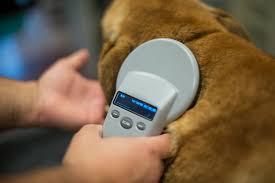
You just adopted a dog. The shelter scanned the chip, handed you a number, and said, “It’s already microchipped.”
So you’re covered, right?
Not yet.
That chip is still registered to the shelter, or the previous owner, or the breeder who sold the litter three years ago. If your dog slips out the gate tonight and a shelter scans that chip, they won’t call you. They’ll call whoever’s name is in the database.
Transferring the microchip to your name is a five-minute job. This guide shows you exactly how to do it.
What does “transferring a microchip” actually mean?
The chip inside your dog never moves. It sits under the skin between the shoulder blades and stays there for life. What changes when you transfer a pet microchip is the record in the database connected to that chip number.
Think of it like a car registration. When you buy a used car, the license plate stays on the vehicle. But you go to the DMV and put your name on the paperwork. If the police run that plate, your name comes up, not the previous owner’s.
A microchip works the same way. The chip stores one number. That number is linked to a name, a phone number, and an address inside a registry database. When a shelter scans a lost dog, they look up that number and call whoever is listed.
If that person is not you, your dog cannot come home to you.
Completing a microchip transfer after adoption means your name, your phone number, and your address are what show up. Not someone else’s.
When do you need to transfer a microchip?
Any time a pet changes hands, the microchip record needs to be updated. Here are the most common situations:
|
Situation |
What you need to do |
|
Adopted from a shelter or rescue |
Transfer the record, the chip is usually in the shelter’s name |
|
Bought from a breeder |
Transfer ownership, breeders often register the whole litter under their details |
|
Rehomed from a private owner |
Ask the previous owner to release the record, then register in your name |
|
Inherited a pet from a family member |
Update the registration to your current contact details |
|
Moved or changed your phone number |
No transfer needed, just log in and update your existing record |
One thing worth knowing: a transfer and an update are two different things. A transfer changes who the registered owner is. An update changes the contact details on an existing registration. Both matter. Neither happens automatically.
How to find out who the chip is registered to right now
Before you can transfer a pet microchip, you need to know where it is currently registered. There are many registries operating in the US, and the chip could be in any one of them.
Here is how to find out in three steps:
|
Step |
What to do |
|
Step 1: Get the chip number |
Check your adoption paperwork, vet records, or breeder certificate. It is a 9, 10, or 15 digit number. If you cannot find it, ask your vet to scan your dog at the next visit. Most clinics do this at no charge. |
|
Step 2: Run a free lookup |
Go to the AAHA Universal Pet Microchip Lookup tool and enter the chip number. This searches multiple databases at the same time and shows you which registry currently holds the record. |
|
Step 3: Contact that registry |
Once you know which registry has the record, contact them to start the transfer process. Most will ask for proof that you are the current owner. |
After you complete the transfer with the original registry, register the chip at NMR so your details are in a nationally searchable database, accessible to shelters and vets across the US, 24 hours a day.
What you need before you start the transfer
Getting these things together before you begin makes the process faster:
|
What you need |
Where to find it |
|
Pet’s microchip number (9, 10, or 15 digits) |
Adoption papers, vet records, or a vet scan |
|
Proof of current ownership |
Adoption certificate, bill of sale, or rehoming agreement |
|
Previous owner’s details if the registry asks |
Ask the shelter, breeder, or previous owner directly |
|
Your current contact information |
Your name, address, phone number, and an emergency contact |
Some registries will ask the previous owner to approve or initiate the transfer.
If you adopted from a shelter, ask them directly: “Has the microchip been released from your registry?” Do not assume it has been done. Confirm it.
How to transfer your microchip at NMR, step by step
Once you have the chip number and proof of ownership, the process is straightforward:
|
Step |
Action |
|
1 |
Find your pet’s chip number from paperwork or a vet scan |
|
2 |
Run a lookup at the AAHA tool to find the current registry |
|
3 |
Contact that registry and request a transfer or release |
|
4 |
Visit nmr.pet and start a new registration with your details |
|
5 |
Fill in your pet’s profile, name, breed, photo, emergency contacts |
|
6 |
Review and submit your information |
|
7 |
Run the chip number through the AAHA tool again to confirm NMR now appears |
The whole process takes under ten minutes. Once it is done, your information is live in NMR’s database. Any shelter, vet, or animal control officer in the US can find you the moment your dog is scanned.
Not sure which plan fits your pet? Compare NMR plans and pick the one that works for you.
What happens if you skip the transfer?
According to a study of more than 7,700 stray animals across 53 shelters, published in the Journal of the American Veterinary Medical Association (Lord et al, July 15, 2009), the top reason microchipped pets were not returned to their owners was a wrong or disconnected phone number. That was 35.4% of all failed reunions. The chip worked. The scan worked. The database worked. The record just had the wrong person in it.
You can read the full stat on the NMR FAQ page.
Here is what happens if your dog goes missing with a chip registered to someone else. A shelter picks up your dog and scans the chip.
They find a number. They look it up and get the previous owner’s name and phone. They call that number. The previous owner may have moved. They may have a disconnected number. Your dog sits in a shelter while you search.
That situation is completely avoidable. Transfer the chip. Put your name in the record.
The same study found that only 58.1% of microchipped animals entering shelters were actually registered in a database. Nearly 4 in 10 microchipped pets had a chip that led nowhere. A microchip transfer after adoption closes that gap for good.
If you want to understand more, read how microchip registration works and check if your pet’s microchip is registered.
Does the previous owner need to do anything?
It depends on which registry holds the current record. Here is what to do based on your situation.
If you adopted from a shelter
The release is usually handled before you take the animal home. But do not assume. Ask the shelter directly: “Has the chip been released from your registry?” Get confirmation in writing before you leave.
If you are rehoming from a private owner
Ask the previous owner to contact their registry and request a transfer or release before you register. Most registries have a simple online form for this. Once they confirm the release, go ahead and register the chip at NMR with your details.
If the previous owner is unreachable
Gather any documents that show you are the current owner. Adoption certificates, vet records, and dated photos all work. Contact NMR and they will guide you through the process with what you have.
For pets with multiple past owners, the history of old registrations does not affect your new record. Register at NMR with your current details and that becomes the active record shelters and clinics will find.
You can also read more about the types of microchips for dogs to understand how the chip and registry system works together.
The chip is already in your dog. It is doing nothing right now except storing a number attached to someone else’s name. Five minutes is all it takes to change that.
Register the chip at NMR. Add your name, your phone number, your address. That is the record a shelter will find if your dog goes missing. That is what brings your dog home. Transfer the chip to your name at NMR and make sure it does.
FAQ
Q. How do I transfer a microchip to a new owner?
Find the chip number, run a lookup at the AAHA tool, contact the current registry to request a release, then register the chip at NMR with your details. It takes under ten minutes.
Q. Can I register a chip that is already registered to someone else?
Yes. Register at NMR with your details. It is best to also ask the previous registry to release the old record so there is no conflict.
Q. Does the previous owner have to approve the transfer?
It depends on the registry. For shelter adoptions, the release is usually done before you take the animal home. For private rehoming, ask the previous owner to contact their registry first.
Q. How do I find out which registry my dog’s chip is with?
Use the AAHA Universal Pet Microchip Lookup tool. Enter the chip number and it will show you which registry currently holds the record.
Q. What if I cannot find the previous owner?
Gather any ownership documents you have, adoption papers, vet records, or dated photos. Contact NMR and they will guide you through the process.
Q.How long does a microchip transfer take?
The registration itself takes under ten minutes. If another registry needs to release the record first, allow a few business days for that step.
Q. Does microchip registration expire after a transfer?
The chip never expires. NMR registration is a one-time payment with no annual renewals. Your record will not lapse.
Q. What is the difference between a transfer and an update?
A transfer changes who the registered owner is. An update changes the contact details on an existing registration. Both are available through your NMR account.